![Minno-Logo-White.svg]](https://www.minnowpod.com/hubfs/Minno-Logo-White.svg)
Step 1: Please confirm the power cable is firmly connected to both the wall outlet and the back of the Pod.
Step 2: Locate the power switch on the back of the pod and ensure it is switched to the ON position (pressed down).
- When ON, the power switch will illuminate green.
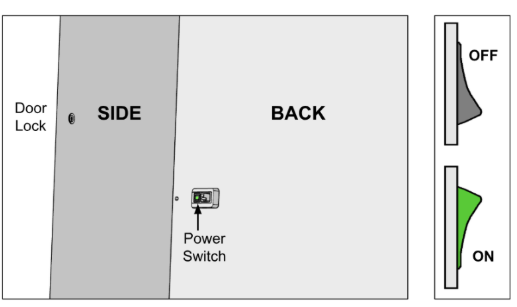
Step 3: Once the Pod is confirmed to be ON, please give the Pod 10 minutes to power up.
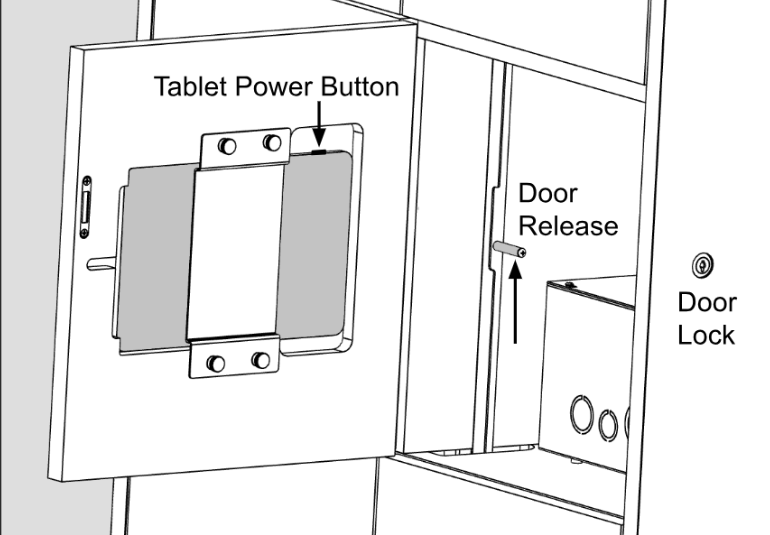
Step 4: After 10 minutes, open the tablet door by using your Door Key and inserting it in the keyhole located on the right side of the Minnow Pod.
Step 5: Locate the tablet's Power Button (shown in the graphic below) on the top side of the tablet. Press & hold the power button to turn ON the tablet. Allow up to 2 minutes to auto-connect to cellular.
*** If the tablet does not turn on, please contact Minnow Support at (503)897-9061 or Support@minnowpod.com for additional assistance.